How to Onboard SEO Clients Fast: The System That Saves 5+ Hours Per Client
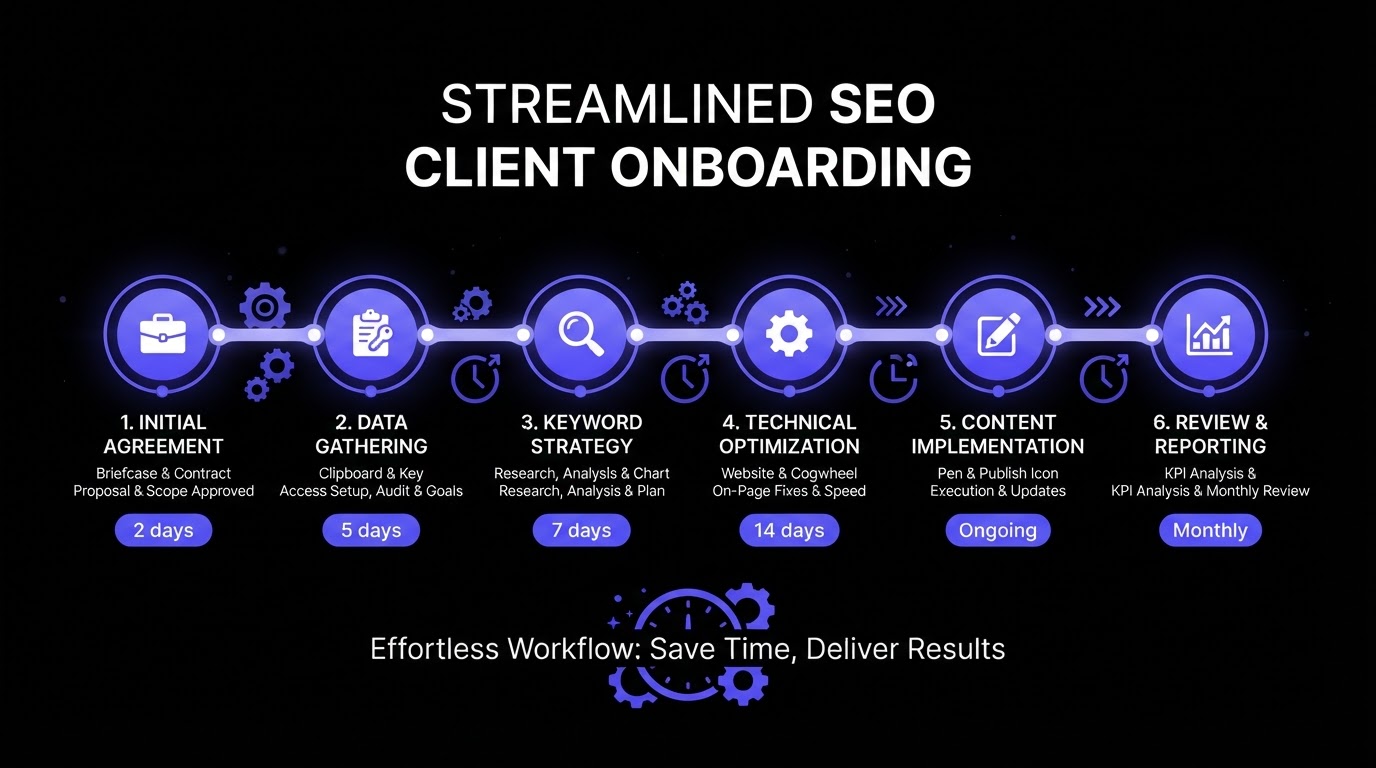
A strong SEO client onboarding process helps you collect access, goals, audience context, content history, approval rules, reporting expectations, and project priorities before the real work begins.
Quick answer: To onboard SEO clients fast, use one repeatable system for intake, access collection, goal setting, site review, content inventory, keyword context, approval workflow, reporting expectations, and kickoff notes. The goal is to remove uncertainty before strategy, briefs, audits, or content production starts.
- Send one structured onboarding questionnaire.
- Collect all account access in a secure checklist.
- Confirm goals, audience, products, and priority pages.
- Document the content workflow and approval process.
- Run a lightweight baseline review.
- Turn onboarding notes into the first SEO roadmap.
Why Does SEO Client Onboarding Matter?
SEO onboarding matters because the first week of a client project sets the quality of everything that follows. If goals, access, approvals, and content context are unclear, the audit, roadmap, briefs, reporting, and execution will all move slower.
Good onboarding saves time because it prevents repeat questions. It also helps the client feel that your process is organized, which matters especially for retainers, content programs, audits, and agency relationships.
Bad onboarding creates hidden costs
When onboarding is loose, the project loses time in small pieces: missing analytics access, unclear CMS permissions, vague business goals, late client approvals, and content briefs that lack product context.
Good onboarding creates delivery speed
When onboarding is structured, the first strategy deliverables are easier to build. You already know the client's offer, audience, constraints, internal links, content history, and decision process.
What Should You Collect During SEO Onboarding?
SEO onboarding should collect both access and context. Access lets you inspect the site. Context lets you make better recommendations.
| Onboarding area | What to collect | Why it matters |
|---|---|---|
| Business goals | Revenue goals, lead goals, priority products, target markets | Connects SEO work to business outcomes |
| Audience | ICP, buyer pain points, decision makers, objections | Improves content angle and keyword prioritization |
| Access | CMS, Search Console, Analytics, tag manager, rank tracker | Allows accurate audit and reporting |
| Content | Existing articles, service pages, offers, brand voice, SMEs | Supports briefs, updates, and internal links |
| Workflow | Approvers, deadlines, feedback rules, publishing owner | Prevents blocked delivery |
The SEO Client Onboarding Process
Use the same sequence for every new SEO client. You can adapt the questions by service type, but the core structure should stay consistent.
1. Send the welcome email
The welcome email should explain what happens next, what the client needs to provide, when the kickoff will happen, and where onboarding materials live.
2. Share the onboarding questionnaire
The questionnaire should collect goals, audience, products, competitors, content history, approvals, and access owners. Keep it practical. Do not turn onboarding into homework that takes a week.
3. Collect access
Create one checklist for all required tools. This prevents scattered messages and lets both sides see what is still missing.
4. Run a baseline review
Before the kickoff call, review the site, analytics, Search Console, existing content, priority pages, and obvious technical issues. This gives the kickoff more substance.
5. Confirm the workflow
Agree on how briefs, drafts, approvals, reporting, publishing, and client feedback will move. This is where many SEO projects slow down if expectations are not clear.
6. Turn onboarding into the first roadmap
After onboarding, create a short first-month roadmap. It should list priorities, deliverables, blockers, and dates.
SEO Client Onboarding Questionnaire
A good questionnaire collects the information you need without overwhelming the client. Use questions that directly support strategy, reporting, or workflow.
Business and goals
- What are the main business goals for SEO?
- Which products, services, or offers matter most right now?
- What counts as a qualified lead or valuable conversion?
- Which markets, locations, or segments should we prioritize?
Audience and positioning
- Who is the ideal customer?
- What problems are they trying to solve?
- Why do customers choose you over alternatives?
- Which claims, phrases, or topics should we avoid?
Content and workflow
- Who approves SEO content?
- Who can provide expert input?
- Who publishes content in the CMS?
- What is the expected review timeline?
- Are there existing brand or editorial guidelines?
If your offer includes content planning or briefs, connect onboarding directly to your brief workflow. A structured system like SEO Content Brief OS helps keep client goals, content notes, keyword intent, outlines, internal links, and review criteria in one Notion-based workspace.
Access Checklist for SEO Clients
Access collection should be boring, secure, and complete. Do not rely on long email threads.
- Google Search Console access.
- Google Analytics access.
- CMS access or publishing contact.
- Google Tag Manager access, if relevant.
- Google Business Profile access, if local SEO is included.
- Existing keyword tracking or SEO platform access.
- Previous SEO reports, audits, or content plans.
- Brand guidelines and product documentation.
- Conversion tracking documentation.
- Developer or technical contact details.
Use permission levels intentionally
Ask for the access level needed to do the work. Some projects require edit permissions. Others only require view access and a publishing contact.
How Do You Set Up the Content Workflow?
For content-focused SEO projects, onboarding should define how ideas become briefs, drafts, approvals, and published URLs.
Define the content stages
A simple content workflow might include idea, keyword selected, brief ready, draft in progress, editing, client review, ready to publish, published, and refresh later.
Map approval responsibilities
Confirm who approves article angles, expert claims, product descriptions, legal-sensitive sections, and final drafts.
Plan internal links early
Internal links should not be added at the last minute. During onboarding, collect priority pages, product pages, service pages, and existing content that should receive links.
Record the final URL
Every published page should have a record that includes URL, publish date, target keyword, content owner, brief, links added, and future refresh notes.
For more help building repeatable content systems, browse the SEO Content Briefs blog.
What Should Happen on the Kickoff Call?
The kickoff call should not repeat the questionnaire. It should clarify priorities, resolve missing inputs, confirm expectations, and align the first phase of work.
- Confirm business priorities and timeline.
- Review the current access checklist.
- Clarify audience, offers, and conversion goals.
- Confirm content or technical workflow.
- Agree on reporting cadence.
- Name blockers and decision makers.
- Confirm the first deliverables and dates.
Keep the kickoff focused
The goal is not to audit the entire website live. The goal is to align the project so the first deliverables can start quickly.
SEO Client Onboarding Checklist
Use this checklist to keep onboarding consistent across clients.
- Welcome email sent.
- Onboarding questionnaire completed.
- Business goals and priority offers confirmed.
- ICP and audience notes documented.
- Competitors and alternatives listed.
- Search Console access received.
- Analytics access received.
- CMS or publishing workflow confirmed.
- Existing content and important URLs reviewed.
- Approval owner and response timeline confirmed.
- Reporting cadence agreed.
- First-month priorities documented.
If you are still building the workspace for onboarding, briefs, and production tracking, the free AI Notion setup guide can help you organize the foundation before adding more tools.
FAQ
What is SEO client onboarding?
SEO client onboarding is the process of collecting goals, access, business context, content history, approvals, reporting expectations, and workflow details before SEO work begins.
How long should SEO onboarding take?
For most small and mid-sized clients, onboarding should take a few days to one week, depending on access speed, stakeholder availability, and project complexity.
What should be in an SEO onboarding questionnaire?
An SEO onboarding questionnaire should ask about business goals, target audience, priority products, competitors, previous SEO work, content workflow, approvals, reporting needs, and tool access.
What access do SEO clients need to provide?
Common access includes Google Search Console, Google Analytics, CMS, Google Tag Manager, Google Business Profile, SEO platforms, previous reports, and relevant product or brand documentation.
How do agencies speed up SEO onboarding?
Agencies speed up onboarding by using a repeatable questionnaire, access checklist, kickoff agenda, content workflow, reporting template, and first-month roadmap.
How does SEO Content Brief OS help with onboarding?
SEO Content Brief OS helps agencies and freelancers organize client content context, keyword research, SEO briefs, internal links, review notes, and production status in one structured Notion workflow.
Next Step
If every new SEO client starts from a blank page, build a repeatable onboarding system first. It will make briefs, reports, audits, and content production easier to deliver.
You can use SEO Content Brief OS to organize client content workflows and SEO briefs, or explore the Complete AI SEO Bundle if you want planning and automation together.
Related Reading
Ready to brief smarter?
Turn any keyword into an agency-grade content brief in 15 minutes. One-time payment.
GET THE COMPLETE BUNDLE — $37 →

