N8N SEO Automation: 7 Workflows That Replace Your Monthly Tool Subscriptions
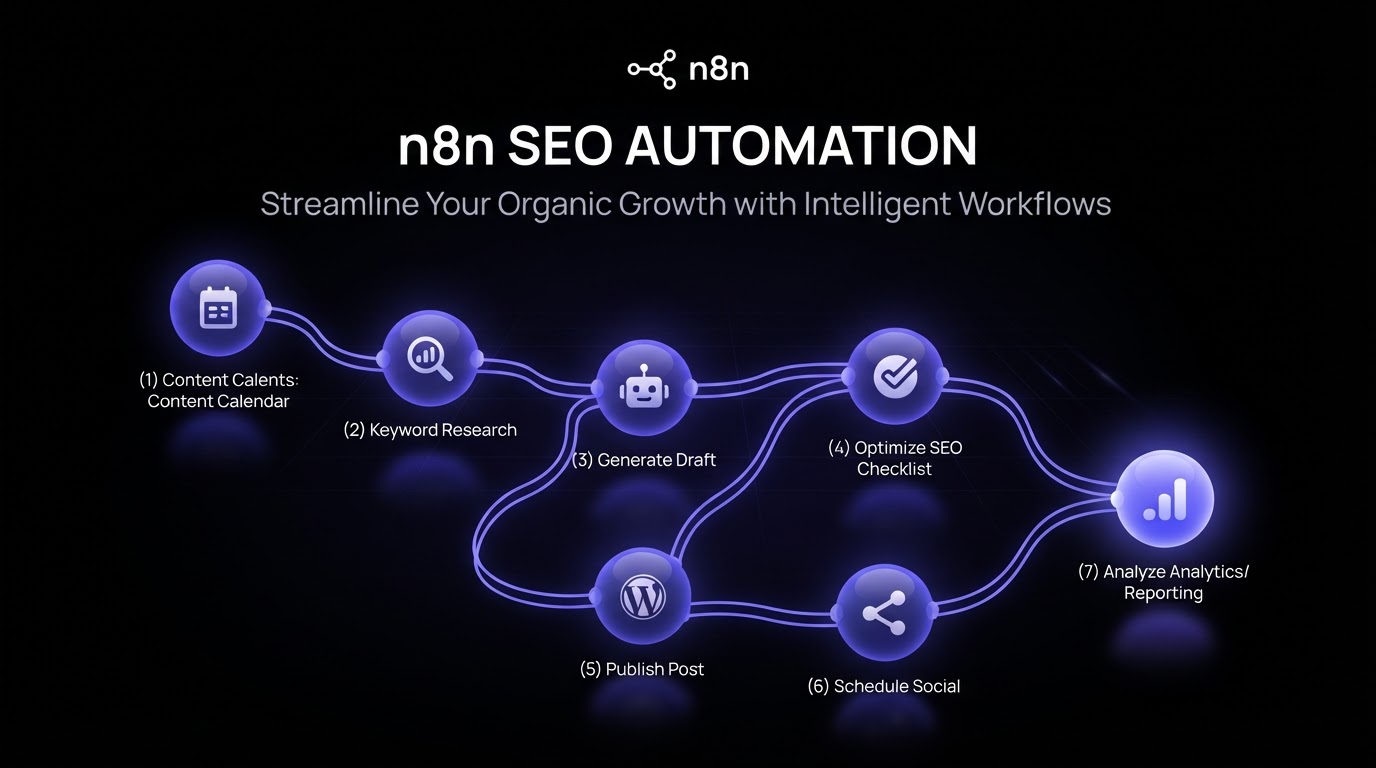
n8n for SEO is useful when your content workflow has repeated steps that can be triggered, routed, enriched, reviewed, or logged automatically. It is not a replacement for strategy, but it can reduce the manual work around SEO operations.
Quick answer: You can use n8n for SEO automation by connecting keyword sources, Notion databases, AI writing assistants, review checklists, spreadsheets, CMS tools, and reporting systems into repeatable workflows. The best use case is not fully replacing human judgment. It is automating handoffs, enrichment, reminders, brief creation support, review queues, and reporting updates.
- Start with a structured SEO content workflow.
- Choose the repeated steps that waste time.
- Use n8n triggers to move data between tools.
- Keep human review points for strategy and quality.
- Log every output back into your content system.
What Is n8n for SEO?
n8n for SEO means using n8n workflows to connect SEO tools, content systems, databases, AI assistants, spreadsheets, and publishing tools so repeated SEO tasks can move with less manual copying and pasting.
In a content workflow, n8n can help collect keyword data, enrich records, create draft tasks, route briefs for review, notify writers, update dashboards, and send reporting summaries.
n8n is the automation layer, not the strategy layer
SEO automation works best when the strategy is already structured. If your keyword research, briefs, review process, and content calendar are unclear, automation will only move unclear work faster.
This is why a Notion-based planning system like SEO Content Brief OS can sit before n8n in the workflow. SEO Brief OS organizes briefs and content decisions. n8n automates repetitive operations around that system.
What Parts of SEO Can You Automate With n8n?
You can automate the parts of SEO that follow predictable rules. You should keep human review for strategy, editorial judgment, expert validation, and final publishing decisions.
| Workflow area | Good n8n automation use case | Human review needed? |
|---|---|---|
| Keyword research | Collect keywords, enrich records, classify intent | Yes, for prioritization |
| SEO briefs | Create brief records, pull SERP notes, assign status | Yes, for angle and quality |
| Content production | Notify writers, update stages, create review tasks | Yes, for editorial approval |
| Internal linking | Suggest candidate pages and log link targets | Yes, for relevance |
| Reporting | Update dashboards, send summaries, flag changes | Yes, for interpretation |
The SEO Content Workflow You Can Automate
A practical SEO content workflow has clear stages. n8n can support many of those stages, but it should not erase the need for a brief, review checklist, or final approval.
1. Keyword intake
A workflow can collect keyword ideas from forms, spreadsheets, SEO tools, Search Console exports, or manual Notion entries.
2. Keyword enrichment
n8n can enrich keyword records with volume, difficulty, SERP notes, intent classification, funnel stage, or topic cluster labels when connected to the right data sources.
3. Brief creation support
n8n can create a new brief record, attach keyword data, pull existing page notes, add internal link candidates, and assign the brief to a strategist.
4. Draft and review routing
When a brief moves to ready status, n8n can create writer tasks, send notifications, update calendar records, and route drafts into review.
5. Publishing handoff
After approval, n8n can create a publishing checklist, notify the CMS owner, record the final URL, and schedule a post-publish review task.
6. Reporting updates
n8n can collect performance data, update a report table, and flag content that may need refreshes.
Example n8n SEO Workflow
Here is a practical workflow for a content team using Notion, SEO data, AI support, and human review.
- A keyword idea is added to a Notion content database.
- n8n detects the new keyword record.
- The workflow enriches the record with SEO data and search intent notes.
- n8n creates a draft brief task and assigns it to the strategist.
- The strategist reviews the angle, audience, internal links, and CTA.
- When approved, n8n notifies the writer and creates a production task.
- The draft moves into review with an editorial checklist.
- After approval, n8n logs the final URL and creates a refresh reminder.
This type of workflow keeps automation close to operations. It helps move the work, but it still leaves quality decisions with people.
How Do Notion and n8n Work Together for SEO?
Notion works well as the structured workspace for SEO content planning. n8n works well as the automation layer that moves data into and out of that workspace.
Use Notion for content records
Notion can store keywords, briefs, outlines, article status, writers, internal links, CTAs, approvals, publish dates, and refresh notes.
Use n8n for movement and enrichment
n8n can watch for new records, enrich data, create tasks, send notifications, update fields, and pass approved content into the next tool.
Use AI assistants carefully
AI can help summarize SERPs, draft outlines, classify intent, or prepare first-pass brief notes. The strategist should still approve the brief before production.
If you need the planning layer first, start with the free AI Notion setup guide. If you already have a content system and want advanced workflows, the n8n SEO Automation Bundle is the natural automation layer.
What Should You Not Automate?
Not every SEO task should be automated. Automation is best for repeatable operations, not for strategic judgment.
Do not automate final strategy approval
Keyword priority, content angle, audience fit, and business value need human review.
Do not automate final publishing without checks
Publishing should include review for formatting, links, factual accuracy, brand voice, and legal-sensitive claims.
Do not automate generic content production at scale
Content still needs clear briefs, expert input, examples, and editorial review. Automation should support quality, not bypass it.
Do not automate reporting interpretation
A workflow can collect data, but a strategist should explain what changed and what the client should do next.
n8n SEO Automation Checklist
Use this checklist before building your first n8n SEO workflow.
- Your SEO content workflow has clear stages.
- Your source of truth is defined.
- Your keyword and brief fields are standardized.
- Human review points are clearly marked.
- Automation triggers are based on reliable statuses.
- Internal link and CTA fields are captured before writing.
- Publishing handoff includes a review checklist.
- Every automated action is logged somewhere visible.
- Reporting workflows explain what data changed.
- There is a manual fallback if an integration fails.
For more planning and workflow guides, browse the SEO Content Briefs blog or the AI SEO Automation blog.
FAQ
What is n8n for SEO?
n8n for SEO means using n8n workflows to connect SEO tools, content databases, AI assistants, reporting systems, and publishing handoffs so repeated SEO operations can run with less manual work.
Can n8n automate SEO content creation?
n8n can automate parts of the SEO content workflow, such as keyword intake, data enrichment, brief task creation, review routing, and reporting updates. Human review should still guide strategy and final quality.
Can n8n work with Notion for SEO?
Yes. n8n can connect with Notion databases to watch for new records, update content status, create tasks, enrich keywords, and move approved work into the next stage.
What SEO tasks are best for n8n automation?
The best tasks are repeated and rule-based: collecting keywords, updating statuses, creating tasks, sending reminders, logging URLs, refreshing reports, and routing reviews.
Should agencies automate SEO publishing?
Agencies can automate publishing handoffs and checklists, but final publishing should include human review for formatting, links, claims, and client approvals.
How does SEO Brief OS fit with n8n?
SEO Brief OS structures the content planning and brief workflow in Notion. n8n can then automate repeated operations around that workflow, such as data enrichment, task routing, notifications, and reporting updates.
Next Step
Before building n8n workflows, make sure your SEO content process is structured. Automation works best when your briefs, statuses, internal links, CTAs, and approvals are already clear.
You can start with SEO Content Brief OS for the planning layer, then add the n8n SEO Automation Bundle when you are ready to automate repeated SEO operations.
Related Reading
Ready to brief smarter?
Turn any keyword into an agency-grade content brief in 15 minutes. One-time payment.
GET THE COMPLETE BUNDLE — $37 →
